Gantt Forecast for Jira
A read-only Gantt that replays how the plan got here.
Documentation · Why it forecasts · Privacy and security · Support
What it does
Three things, on one screen.
- A timeline of the issues your JQL selects, with epics rolled up from their children.
- A forecast — the cumulative completion curve and the finish date your current pace implies, withheld when there is not enough finished work to mean anything.
- The history of the plan — rewind the whole chart to any past day, reconstructed from Jira's own change log.
It holds two read permissions and nothing else. It cannot create, edit, move or delete an issue, and Atlassian enforces that, not us. Dates change in Jira only.
Getting started
- Install the app.
- Open any Jira project and pick Gantt Forecast in the project sidebar.
- That is all. There is nothing to configure — the app works out which date field your issues actually use and prints what it found at the top of the chart.
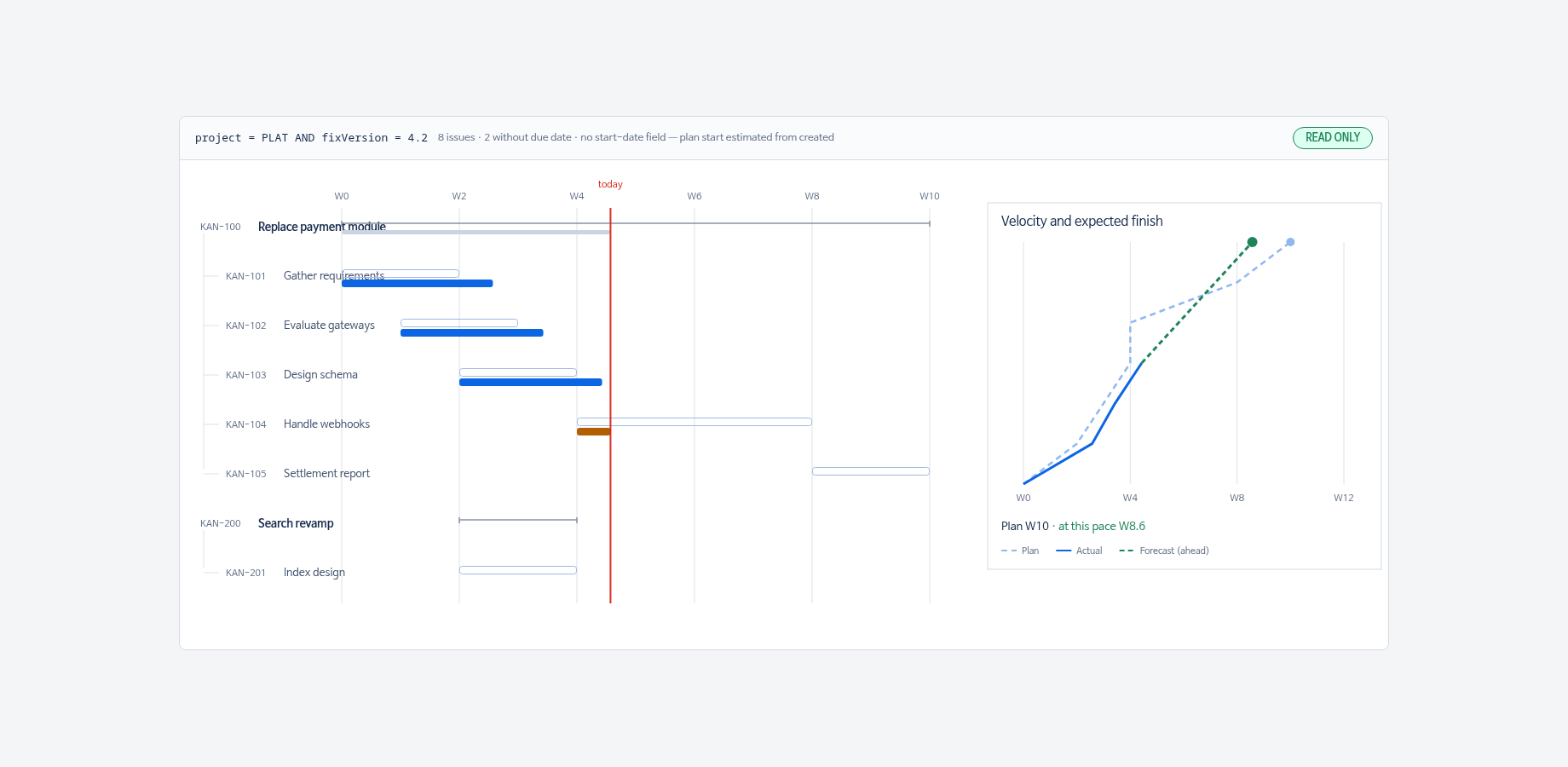
Reading the chart
| What you see | What it means |
|---|---|
| Pale filled bar | The planned span, from a real start date to the due date. |
| Hollow outlined bar | The same, but the start is estimated — your issues have no start-date field set, so the created date stands in for it. |
| Solid blue / amber bar | What actually happened. Blue when finished, amber while in progress. |
| Diamond ◆ | The issue has only one date. We draw a milestone rather than invent a span. |
| Bracket with end ticks | An epic. Its span is rolled up from its children, so it is drawn differently from a task bar. |
| Chevron ▸ at the right edge | The bar runs past the visible axis. It is not cut off; it continues. |
| Red vertical line | Today. |
The right-hand panel
Two cumulative curves: the planned finish dates and the ones actually reached. The gap between their slopes is the delay. A dashed line projects the current pace to a finish date, drawn green when it beats the plan and red when it does not, with the slip in weeks.
History mode
Switch the toggle from Now to History.
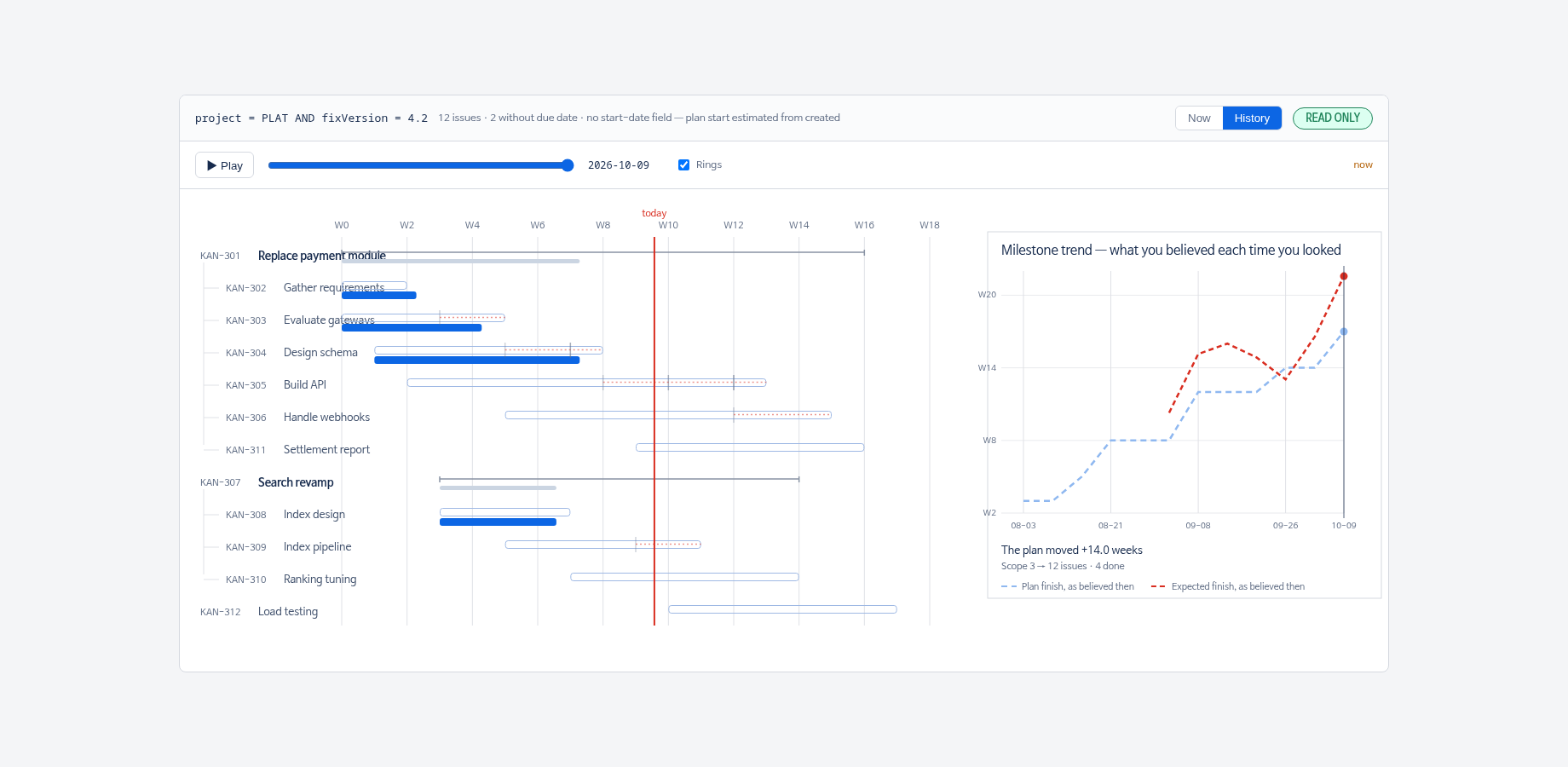
| Control | What it does |
|---|---|
| Scrubber | Moves the whole chart to a past day. Bars move to where they were then; issues created after that day are not shown. |
| Play | Runs through the snapshots in order, so the plan moving is something you watch rather than infer. |
| Rings | Faint vertical marks on each row where its due date used to sit — oldest palest — with a dotted trail to where it is now. Red if it drifted later, green if it pulled in. |
| Hover a bar | How many times that due date moved, and the last three moves with dates. |
Milestone trend
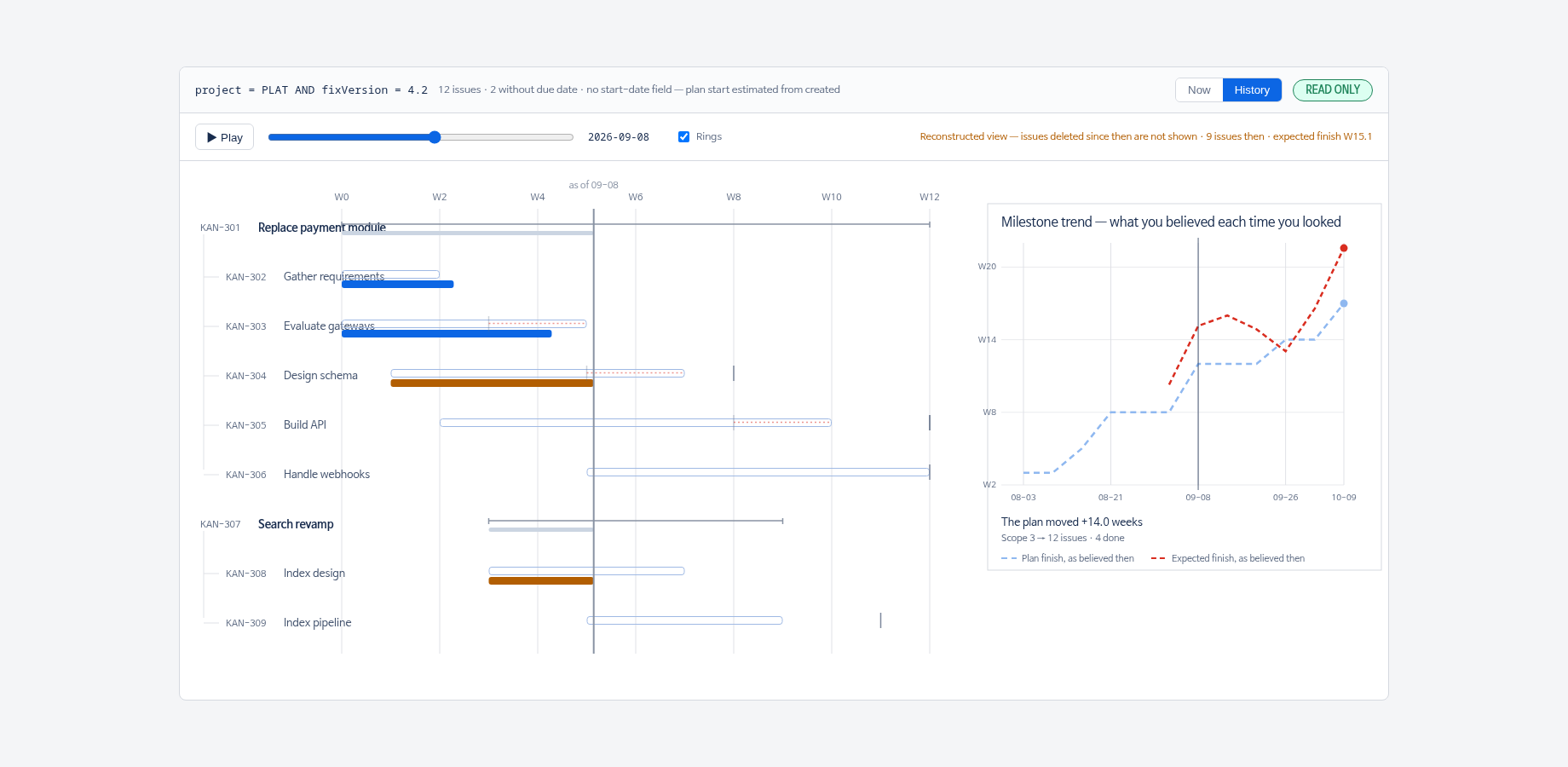
In History mode the right panel changes: the horizontal axis is when you looked and the vertical axis is the finish date you believed then. A flat line means the plan held. A climbing line means it moved every time you checked. Underneath, how many weeks the plan moved in total and how much the scope grew.
No baseline needed
Nothing has to be set up in advance. The history comes from Jira's change log, which has been recording since long before you installed this app, so the past is there on day one.
Dates, fields and languages
Jira Software's Start date is an ordinary custom field: its id differs between sites and its name differs between languages, so it cannot be hardcoded. The app picks a field in this order:
- A field whose schema can only mean "start" (for example an Advanced Roadmaps baseline start).
- Otherwise, whichever date field your issues actually fill in.
- Otherwise none — and it says so, falling back to the created date for the plan start and drawing those bars hollow so you can see which dates are real.
Done-ness is read from the issue's status category, not from a status named "Done", so it works whatever your workflow calls things and whatever language it is in. The interface is English; it switches to Korean when your Jira locale is Korean.
Permissions and data
| Scope | Why |
|---|---|
read:jira-work | Read issues, their dates, their change log. |
read:jira-user | Show assignee names. |
There are no write scopes. There is no storage: the app keeps nothing between page loads, so there is no copy of your issues anywhere to leak or to delete. Change history is read when you open History mode and discarded when you leave.
On very large result sets the history read stops at a time limit and tells you, rather than returning a half-read history that would look complete and be wrong. Narrow the JQL if you hit it.
Limits
- Issues deleted since a past day cannot be reconstructed (see above).
- A field that never changed has no change-log entry, which the app reads — correctly — as "it was always this".
- The forecast counts issues, not their size. That assumption is printed next to the number.
Support
Questions and bug reports go to support@secondtiger.com. The support page says what to include and how quickly we answer, and lists the three things people usually write in about. Include your site, the JQL, and a screenshot — the chart prints what it detected, which is usually enough to find the problem.